MT4 Expert Advisor Live account active

APEX
DAYTRADER
EA · MT4

Apex detects directional bias through four simultaneous candlestick pair comparisons, with optional pinbar detection as an alternative entry trigger. Entry requires alignment across dual EMA pairs, ADX trend strength, and RSI momentum — all evaluated once per candle close to eliminate mid-candle noise. Position management includes adaptive TP adjustment, MACD and Stochastic profit-locking systems that secure gains without closing the trade, ATR trailing, partial close, and consecutive loss protection that resyncs against real trade history after every restart.

+110.2%
Combined · 4 accounts
Live gain
1.34
Profit Factor
Combined
4
Live accounts
Myfxbook
Verify live
Independent audit
Apex DayTrader EA
$700
$900
one-time payment · lifetime license · 15 MT4 activations
15 activations per license
Lifetime license · No subscription
Free future updates forever
Direct developer support
4 live Myfxbook accounts
Set files · 6 pairs included
Monte Carlo PDF included
No martingale · No grid · Always stop loss
Buy Now — $700 → Verify Live on Myfxbook →
No martingale
No grid trading
Fixed stop loss
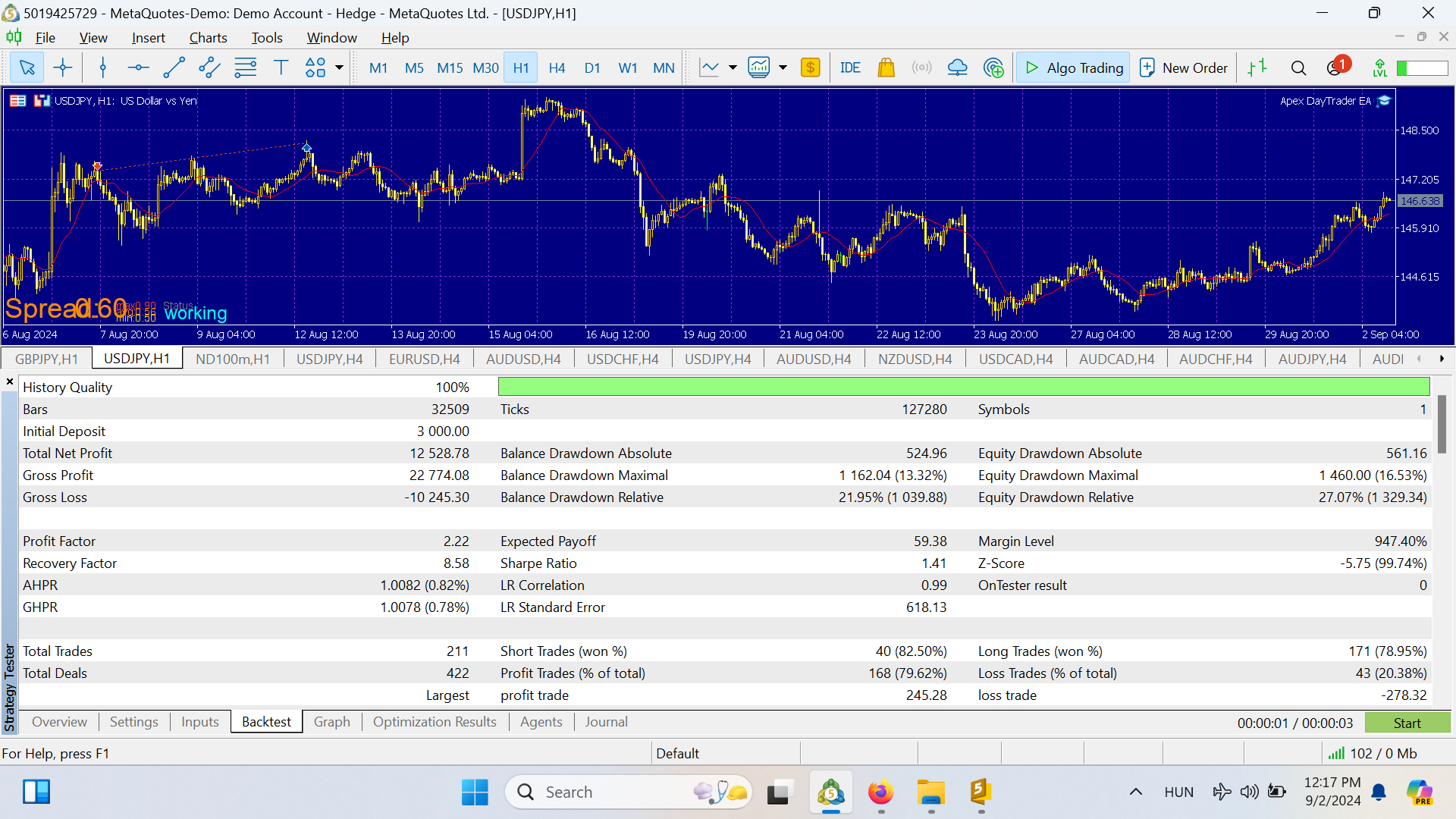
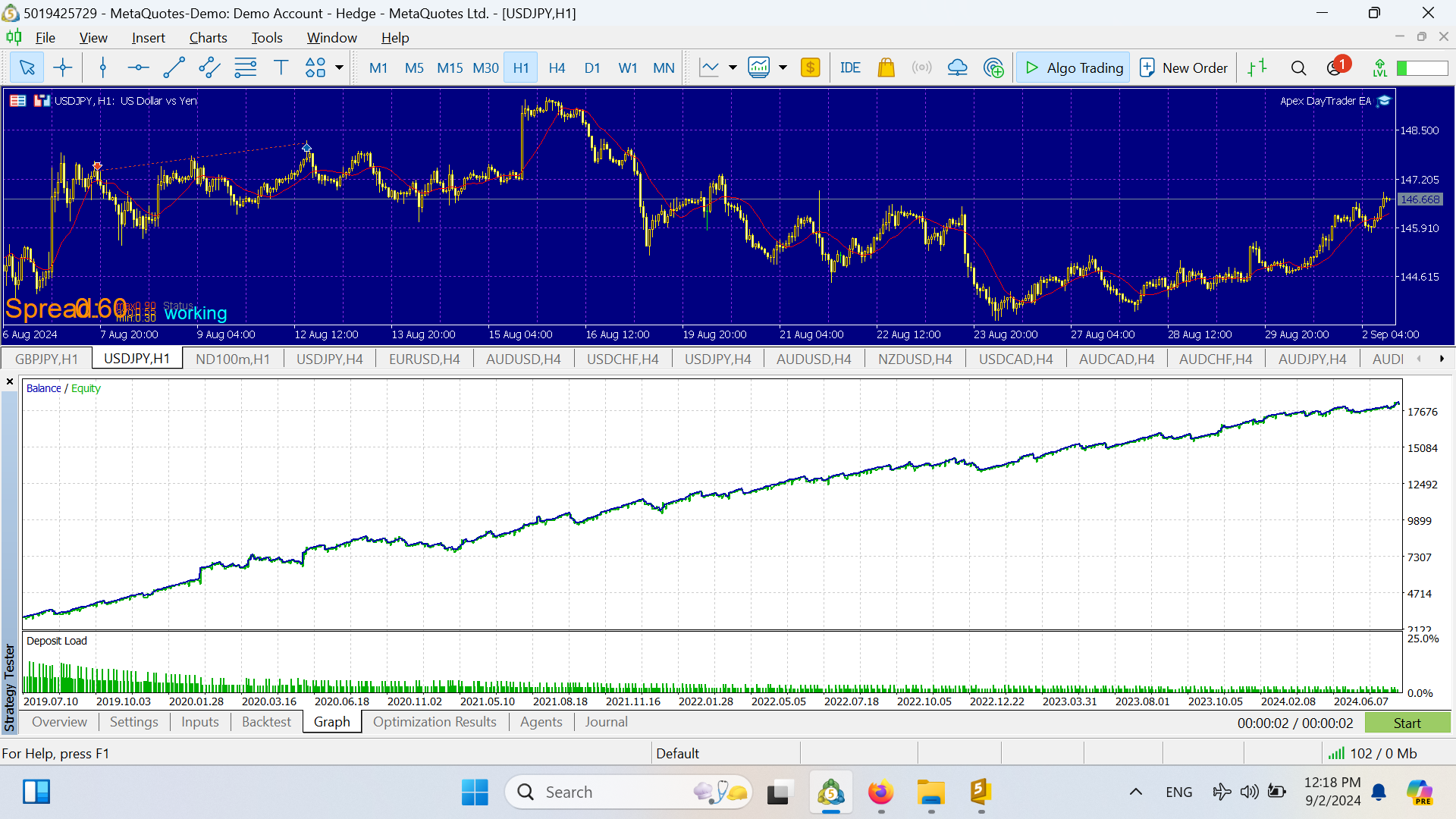
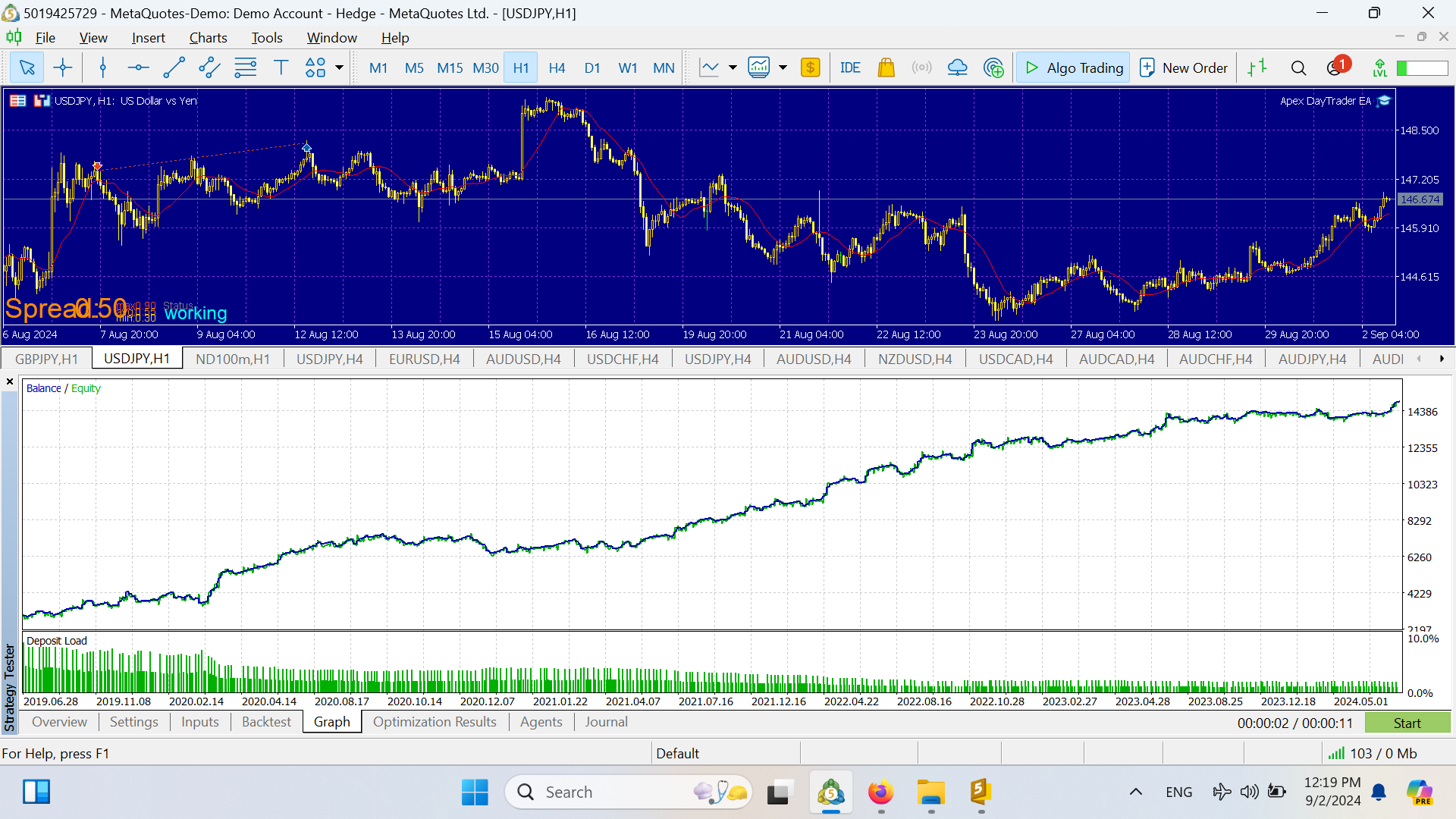
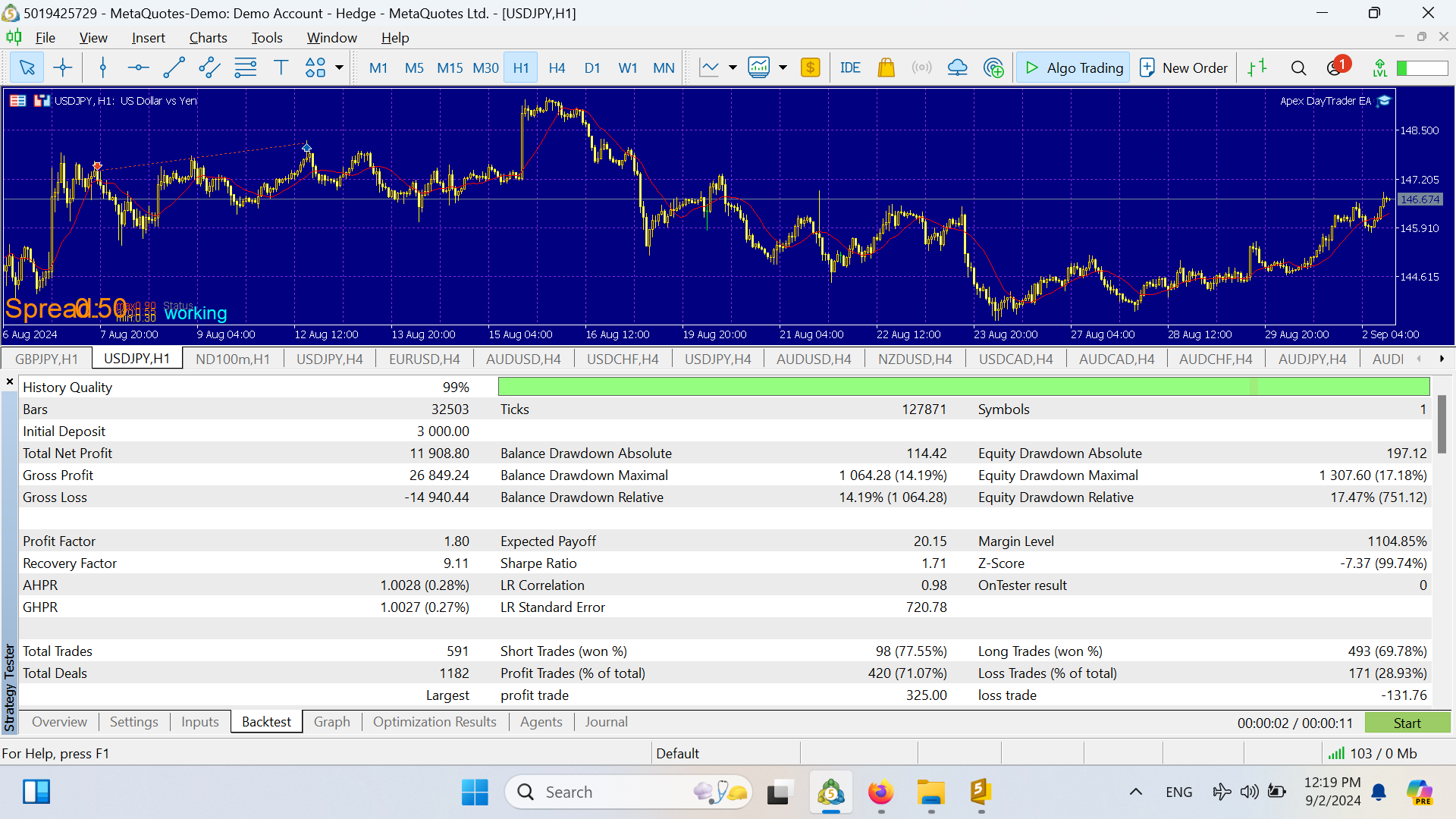
99.9% tick data tested
Monte Carlo A+ score
Prop firm compatible

10-YEAR
PORTFOLIO

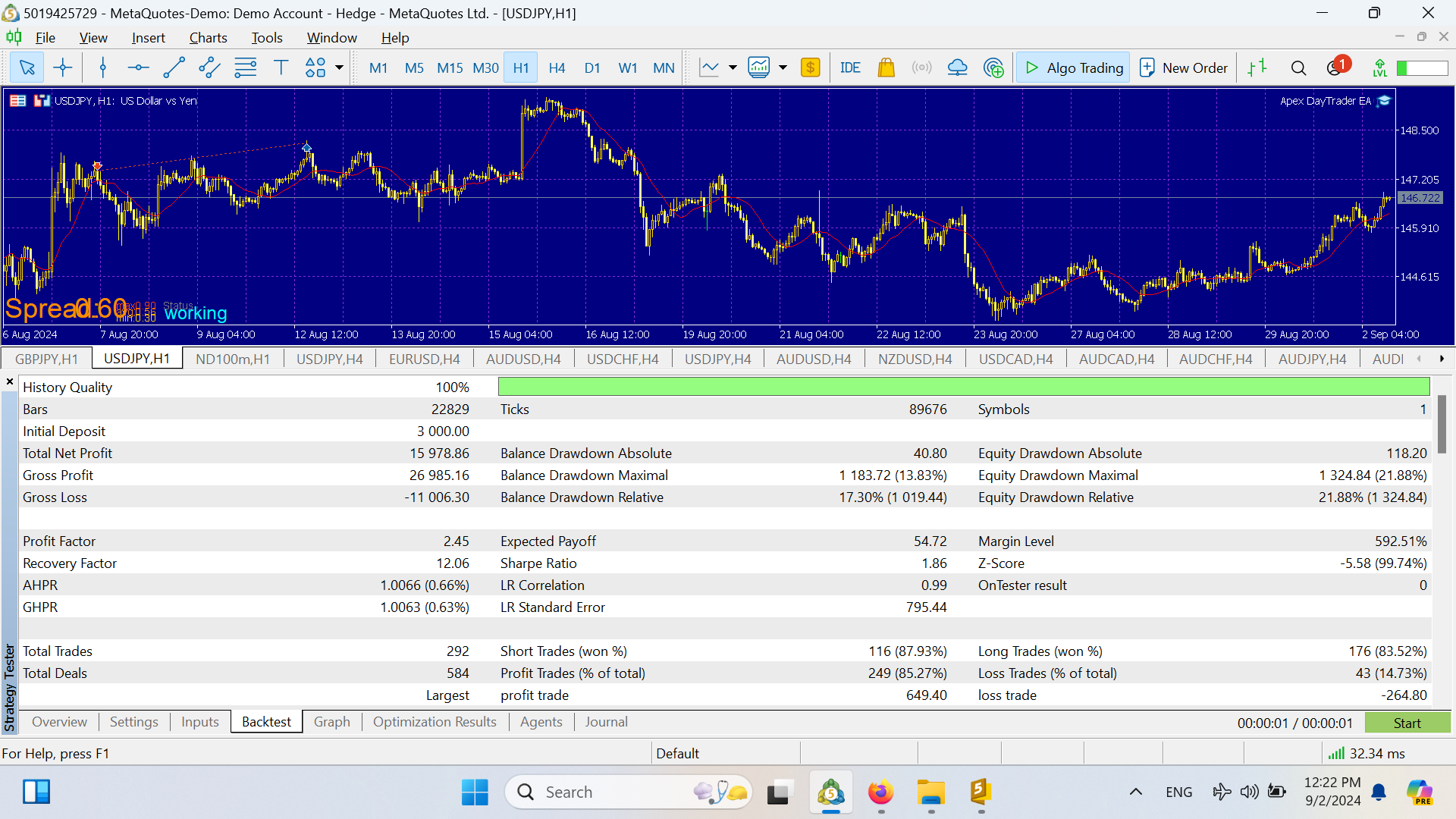
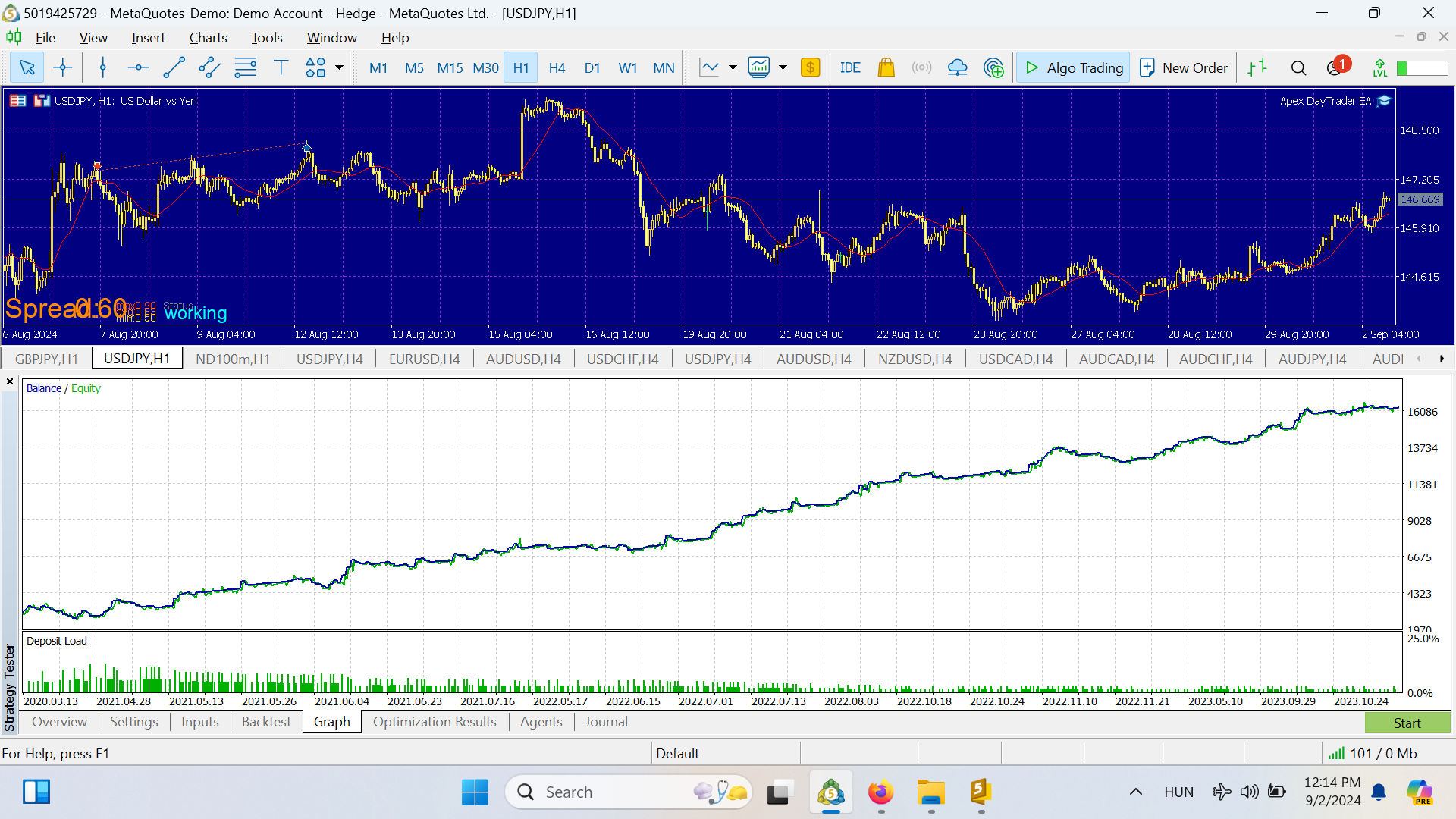
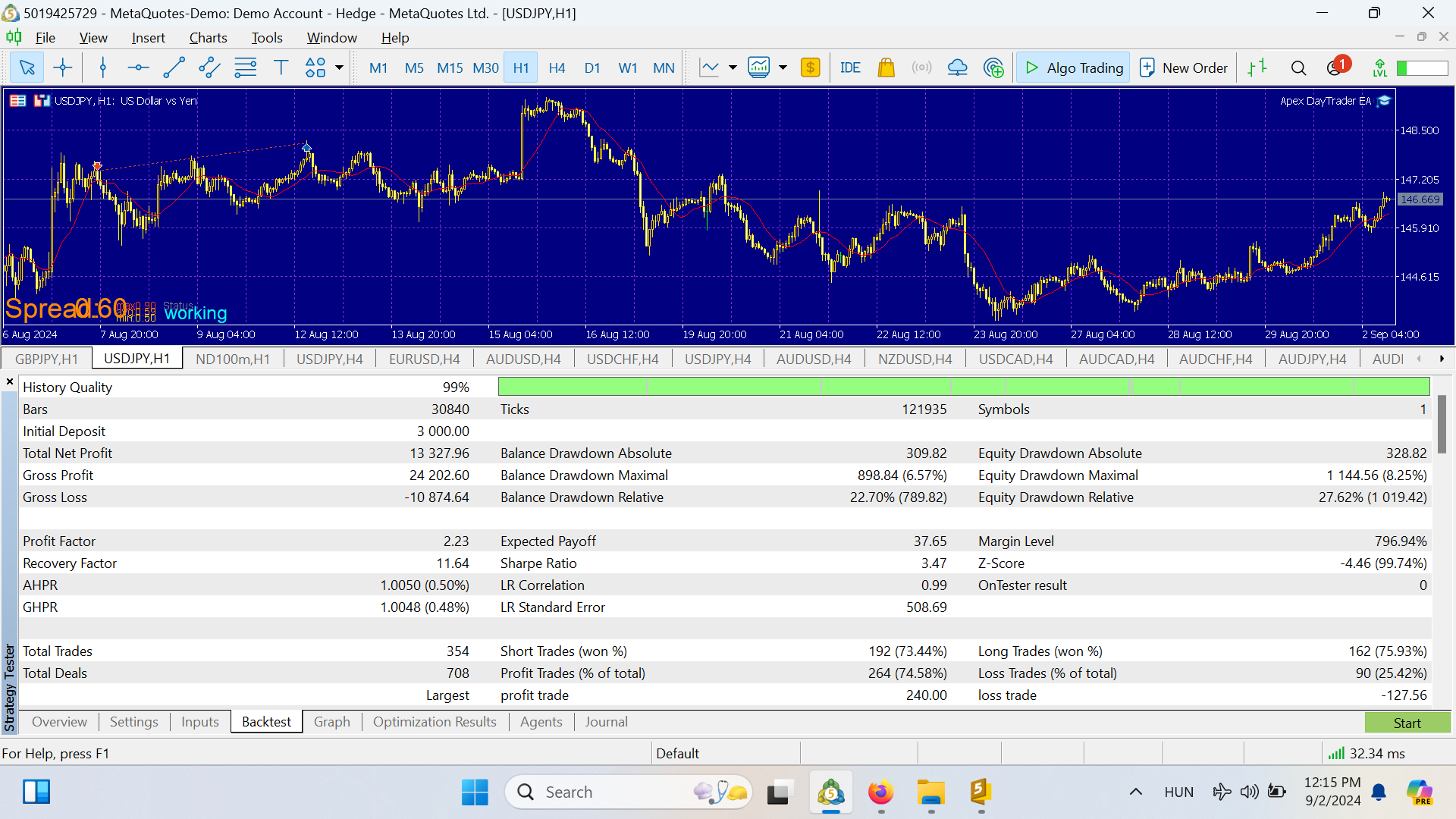
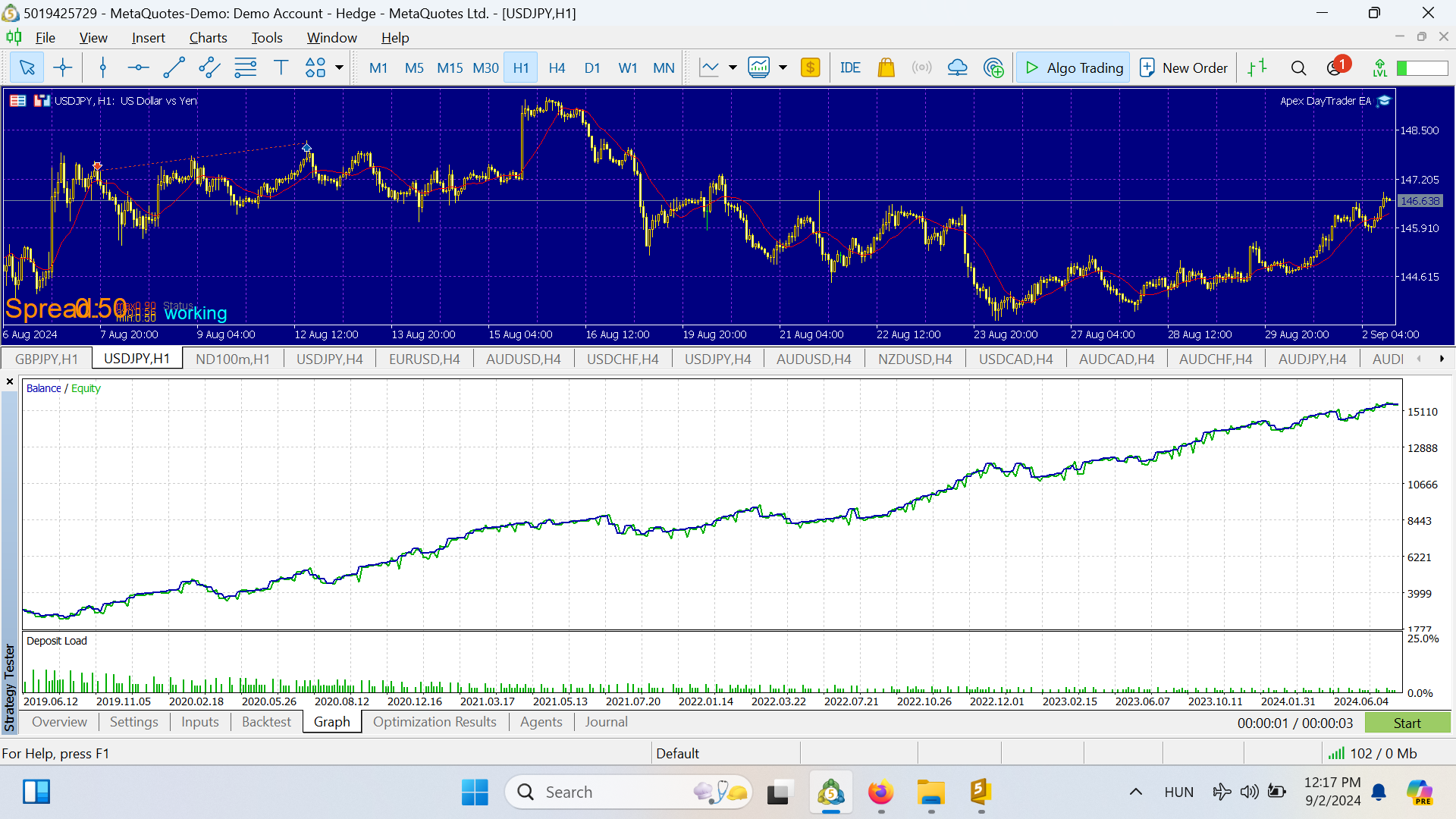
Every pair tested with 99.9% tick data quality. No curve-fitting. Results are reproducible.
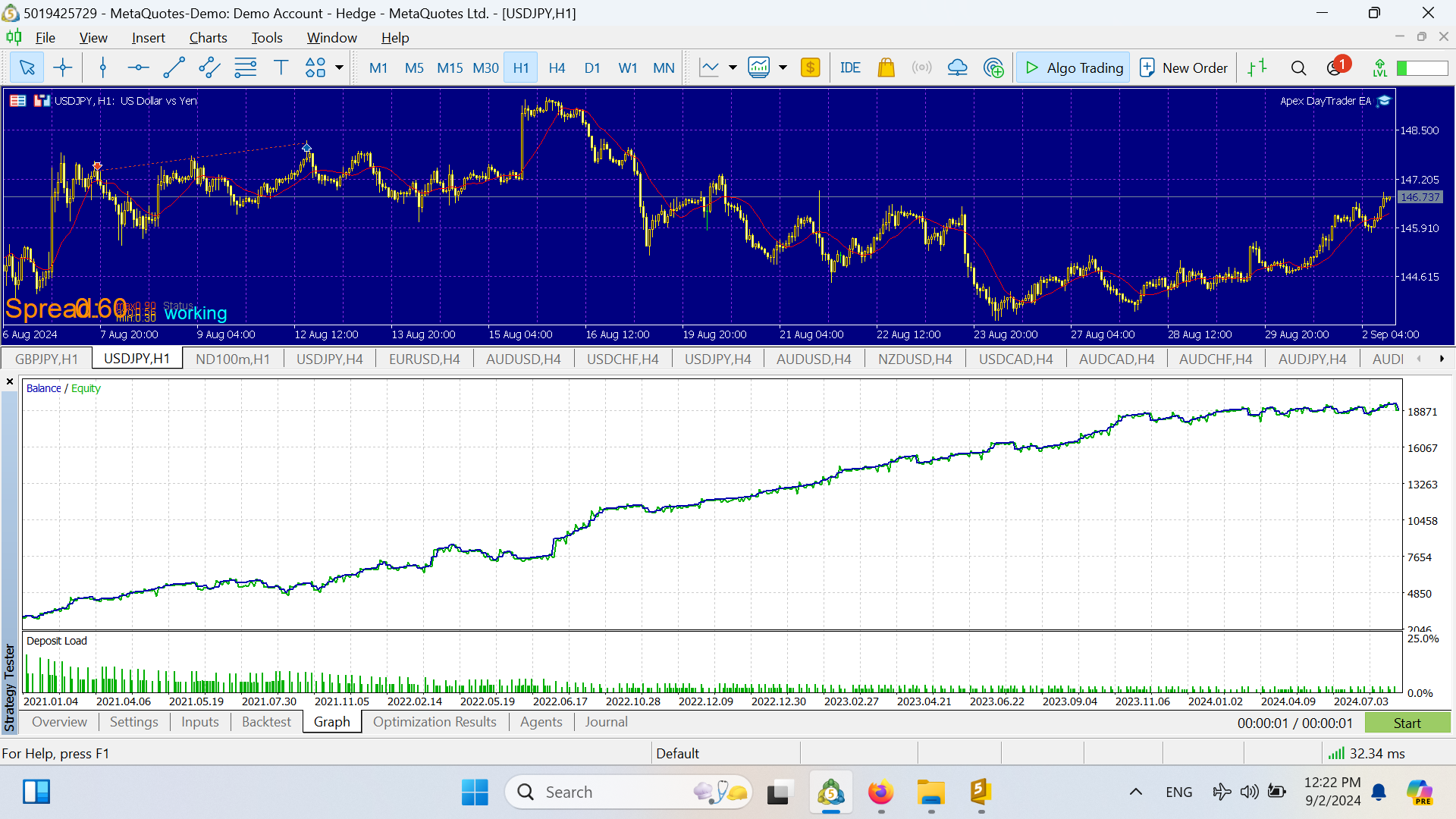
EURUSD H1 · Special set included
EURUSD equity curve EURUSD stats
XAUUSD (Gold) H1
XAUUSD equity curve XAUUSD stats
NZDUSD H1
NZDUSD equity curve NZDUSD stats
USDCAD H1
USDCAD equity curve USDCAD stats
GBPUSD H1
GBPUSD equity curve GBPUSD stats
Live accounts — all verified on Myfxbook
Apex Main · Pepperstone
Main account · Day trading
LIVE
+57.1%
Gain
1.37
PF
Verify
Myfxbook
Age
Apex M15 @ ICMarkets
M15 timeframe · ICMarkets
LIVE
+14.1%
Gain
1.06
PF
Verify
Myfxbook
Age
Apex H1 V2 @ ICMarkets
H1 V2 · ICMarkets
LIVE
+21.2%
Gain
1.4
PF
Verify
Myfxbook
Age
Apex M5 @ ICMarkets
M5 timeframe · ICMarkets
LIVE
+17.8%
Gain
1.54
PF
Verify
Myfxbook
Age

SUPPORTED PAIRS

Set files included in the package for all pairs below. More pairs and indices being added continuously.

EURUSD H1 USDJPY H1 USDCAD H1 NZDUSD H1 GBPUSD H1 XAUUSD H1 More coming soon…

→ Planning to add all major, minor pairs, metals and top indices

KEY FEATURES

Every component of the Apex EA is designed around one principle: protect capital first, grow it second.

🕯️
Sophisticated Price Action
Analyzes complex candle formations across multiple timeframes. Trades based on sound technical analysis, not random market noise.
🛡️
Safe & Controlled Trading
Zero martingale, zero grid. Every trade has a predefined stop loss and take profit. Your capital is always protected.
⚖️
Dynamic Money Management
Tailored settings for both buy and sell trades. Adjustable volume sizes with precise stop-loss configurations and dynamic exit management.
📊
Indicator Confirmation
RSI and moving averages provide an extra layer of trade validation, ensuring every entry aligns with the overall market trend.
🕐
Time-Based Filters
Precise day and hour settings let you avoid trading during high-risk periods — news events, low liquidity, session transitions.
🎯
Advanced Drawdown Control
MaxDD setting caps your maximum loss at a predefined level. Never exceed your risk tolerance, even in volatile conditions.

INPUT PARAMETERS

All parameters are pre-configured in the included set files. Everything below is adjustable — full control over every aspect of the EA.

1. Basic Settings
9 parameters
Magic Number
InpMagicNumber
Unique identifier for this EA's trades. Change if running multiple EAs on the same account.
Trade Comment
InpTradeComment
Label attached to every order — useful for tracking in your trade history.
Show Dashboard
InpShowDashboard
Toggles the on-chart info panel showing live EA status.
Spread Filter
InpEnableSpreadFilter
Skips entries when spread exceeds the set threshold. Recommended for volatile sessions.
Max Spread (Pips)
InpMaxSpreadPips
Maximum allowed spread before the EA declines to open a trade.
Once Per Bar
InpOncePerBar
Prevents multiple entries on the same candle. Recommended: enabled.
Renko Filter
InpEnableRenkoFilter
Adds a trend confirmation layer using Renko bricks before entry.
Renko Brick Size
InpRenkoBrickSizePips
Size of each Renko brick in pips — used for trend direction confirmation.
Min Consecutive Bricks
InpRenkoTrendBricks
Minimum number of same-direction bricks required to confirm a trend.
2. Position Size & Risk
8 parameters
Position Sizing Mode
InpPositionSizing
Fixed lot or risk-based (% of account). Risk-based recommended for prop firm accounts.
Fixed Lot Size
InpFixedLotSize
Lot size used when Fixed mode is selected. Default: 0.01.
Risk Percentage
InpPercentage
Percentage of account balance risked per trade when using risk-based sizing.
Max Lot Size
InpMaxLotSize
Safety cap — the EA will never exceed this lot size regardless of account size.
Consecutive Loss Protection
InpEnableConsecutiveLossProtection
Pauses trading after a set number of consecutive losses to protect capital.
Max Consecutive Losses
InpMaxConsecutiveLosses
Number of losses in a row before the EA pauses. Default: 5.
Stop Duration (Hours)
InpConsecutiveStopHours
How long the EA stays paused after triggering loss protection.
Auto-Reset on New Day
InpResetOnNewDay
Automatically resets the consecutive loss counter at the start of each trading day.
3. Stop Loss & Take Profit
5 parameters
SL/TP Mode
InpSLTPMode
Fixed pips or ATR-based dynamic levels. Fixed is simpler; ATR adapts to volatility.
Stop Loss (Pips)
InpStopLossPips
Fixed stop loss distance. Default: 30 pips. Always active — no trade without a stop.
Take Profit (Pips)
InpTakeProfitPips
Fixed take profit target. Default: 60 pips (1:2 R:R).
ATR Multiplier SL
InpATRMultiplierSL
ATR mode only: stop loss = ATR × multiplier. Default: 1.5×.
ATR Multiplier TP
InpATRMultiplierTP
ATR mode only: take profit = ATR × multiplier. Default: 2.0×.
4. Position Management
7 parameters
Break-Even
InpEnableBreakEven
Moves stop loss to entry price once the trade reaches a set % of take profit.
Break-Even Trigger (%)
InpBreakEvenPct
Percentage of TP reached before stop is moved to entry. Default: 75%.
Adaptive TP
InpEnableAdaptiveTP
If the trade moves against you by X pips, TP is reduced to a closer target to increase chance of recovery.
Adaptive Loss Trigger
InpAdaptiveLossPips
Pips in drawdown before the reduced TP kicks in. Default: 50 pips.
Reduced TP Target
InpAdaptiveTPPips
New take profit target once adaptive mode is triggered. Default: 35 pips.
ATR Trailing Stop
InpEnableATRTrailing
Dynamic trailing stop that follows price using ATR distance. Disabled by default.
Start Trailing At (%)
InpStartTrailingPct
Percentage of TP reached before the trailing stop begins following price.
5. Trading Schedule & Filters
10 parameters
News Filter
InpEnableNewsFilter
Pauses trading around high-impact news events. Recommended for prop firm accounts.
Avoid Before News
InpNewsAvoidMinutesBefore
Minutes before a news event when trading is suspended. Default: 30.
Resume After News
InpNewsAvoidMinutesAfter
Minutes after a news event before trading resumes. Default: 30.
Asian Session
InpEnableAsianSession
Enable trading during 23:00–08:00 GMT. Default: enabled.
London Session
InpEnableLondonSession
Enable trading during 08:00–17:00 GMT. Default: enabled.
New York Session
InpEnableNewYorkSession
Enable trading during 13:00–22:00 GMT. Default: enabled.
Overlaps Only
InpTradeOnlyDuringOverlaps
Restricts trading to session overlap periods only (higher volatility).
Avoid Lunch Hours
InpAvoidLunchHours
Skips the 12:00–14:00 GMT low-volume window. Default: enabled.
Friday Auto-Close
InpEnableFridayClose
Automatically closes all positions before the weekend. Default: disabled.
Allowed Months
InpAllowedMonths
Comma-separated list of months when the EA is allowed to trade. Default: all months.
6. Partial Close
4 parameters
Partial Close
InpEnablePartialClose
Closes a portion of the position at a set profit level, locking in gains while keeping the rest running.
Partial Close Trigger
InpPartialTriggerPips
Profit in pips at which the partial close fires. Default: 50 pips.
Close Percentage
InpPartialClosePercent
Percentage of the position to close at the trigger. Default: 50%.
Move to Break-Even After
InpMoveToBreakeven
After the partial close, moves the stop to entry price on the remaining position.
7. Smart Exit Strategies
8 parameters
RSI Profit Exit (Buy)
InpRSIExitBuyPips
Closes a BUY trade when RSI exceeds 70 AND profit ≥ X pips. Locks in gains at overbought.
RSI Profit Exit (Sell)
InpRSIExitSellPips
Closes a SELL trade when RSI drops below 30 AND profit ≥ X pips.
ADX Weakness Exit
InpADXExitPips
Closes when ADX drops below 10 (trend weakening) AND profit ≥ X pips.
RSI Loss Exit (Buy)
InpRSILossBuyPips
Cuts a losing BUY when RSI drops to 30 or below AND loss ≥ X pips — trend reversal signal.
RSI Loss Exit (Sell)
InpRSILossSellPips
Cuts a losing SELL when RSI reaches 70 AND loss ≥ X pips.
MACD Cross Exit
InpEnableMACDExit
Closes on a MACD crossover if the trade is in loss — exits losing momentum trades early.
MACD Exit Threshold
InpMACDLossPips
Minimum loss in pips before the MACD cross exit fires. Default: 32 pips.
Time-Based Exit
InpEnableTimeExit
Forces close after X hours if no profit achieved. Prevents trades from sitting open indefinitely.
8. Indicator Filters
13 parameters
ADX Period
InpADXPeriod
Period for the ADX trend strength filter. Default: 14.
ADX Threshold
InpADXThreshold
Minimum ADX value required before the EA will enter. Higher = stronger trends only. Default: 25.
RSI Period
InpRSIPeriod
RSI calculation period. Default: 14.
RSI Buy Level
InpRSIBuyLevel
RSI must be above this value to trigger a buy entry. Default: 65.
RSI Sell Level
InpRSISellLevel
RSI must be below this value to trigger a sell entry. Default: 35.
EMA Fast 1
InpEMAPeriodFast1
Fast EMA for short-term trend pair. Default: 9.
EMA Slow 1
InpEMAPeriodSlow1
Slow EMA for short-term trend pair. Default: 42.
EMA Pair 2 Filter
InpEnableEMA2Filter
Adds a second EMA pair (50/200) as a long-term trend confirmation layer.
OBV Filter
InpEnableOBVFilter
On-Balance Volume filter — confirms entries are supported by volume direction. Default: enabled.
OBV MA Period
InpOBVMAPeriod
Moving average period applied to OBV for smoothing. Default: 16.
AO Filter
InpEnableAOFilter
Awesome Oscillator confirmation. Default: disabled.
CCI Filter
InpEnableCCIFilter
CCI momentum confirmation. Default: disabled.
Bollinger Bands Filter
InpEnableBBFilter
Bollinger Bands breakout or reversal filter. Default: disabled.
9. Entry Signals — Candle Patterns
2 parameters
Sell Pattern Pairs (×4)
InpSellLeftShift1–4 / InpSellRightShift1–4
Four sell signal patterns — each defined by two candle position offsets (left/right shift). These are the proprietary pattern parameters optimised per set file. Do not change unless re-optimising.
Buy Pattern Pairs (×4)
InpBuyLeftShift1–4 / InpBuyRightShift1–4
Four buy signal patterns — same structure as sell patterns. Pre-optimised values are included in every set file.

READY TO
TRADE SMARTER?

Lifetime license. 15 activations. Free future updates. Direct developer support. No dangerous strategies — ever.

What you need to run this EA
IC Markets MY BROKER · 5YRS
ECN broker · MT4/MT5/cTrader · Raw spreads
Dipgate VPS MY VPS · 3YRS
Low-latency forex VPS · 24/5 uptime

Past performance is not indicative of future results. Trading forex involves substantial risk of loss and is not suitable for all investors. Only trade with capital you can afford to lose. Backtest results are simulated and do not guarantee live performance.