MT5 Indicator
● Available now
Up to 50 MAs
All symbols
Spectrum
Trend
Pro
50 moving averages. One rainbow. Instant clarity on trend direction, strength, and potential reversals — visualized in a stunning spectrum that makes market sentiment impossible to misread.
50
Max MAs
6
Timeframes
Real-time
Sentiment
4
MA Types
MT5
All Forex pairs
Indices
Gold & Commodities
Crypto
Price
$220
one-time · lifetime license
Get Spectrum Trend Pro →
✓MT5 .ex5 file — instant delivery
✓Full user manual included
✓Lifetime updates — free
✓Email support
✓No DLL · No expiry · No subscription
✓Works on any broker & account type
Platform
MetaTrader 5
Max MAs
Up to 50
MA Types
SMA · EMA · SMMA · LWMA
Timeframes
M15 M30 H1 H4 D1 W1
Sentiment
Real-time %
Alerts
Configurable
Repaints
No
DLL required
No
Live preview
What it looks like on your chart
The rainbow spectrum drapes over your chart as an overlay. The MTF panel sits in the corner — small, clean, actionable. No clutter. Just signal.
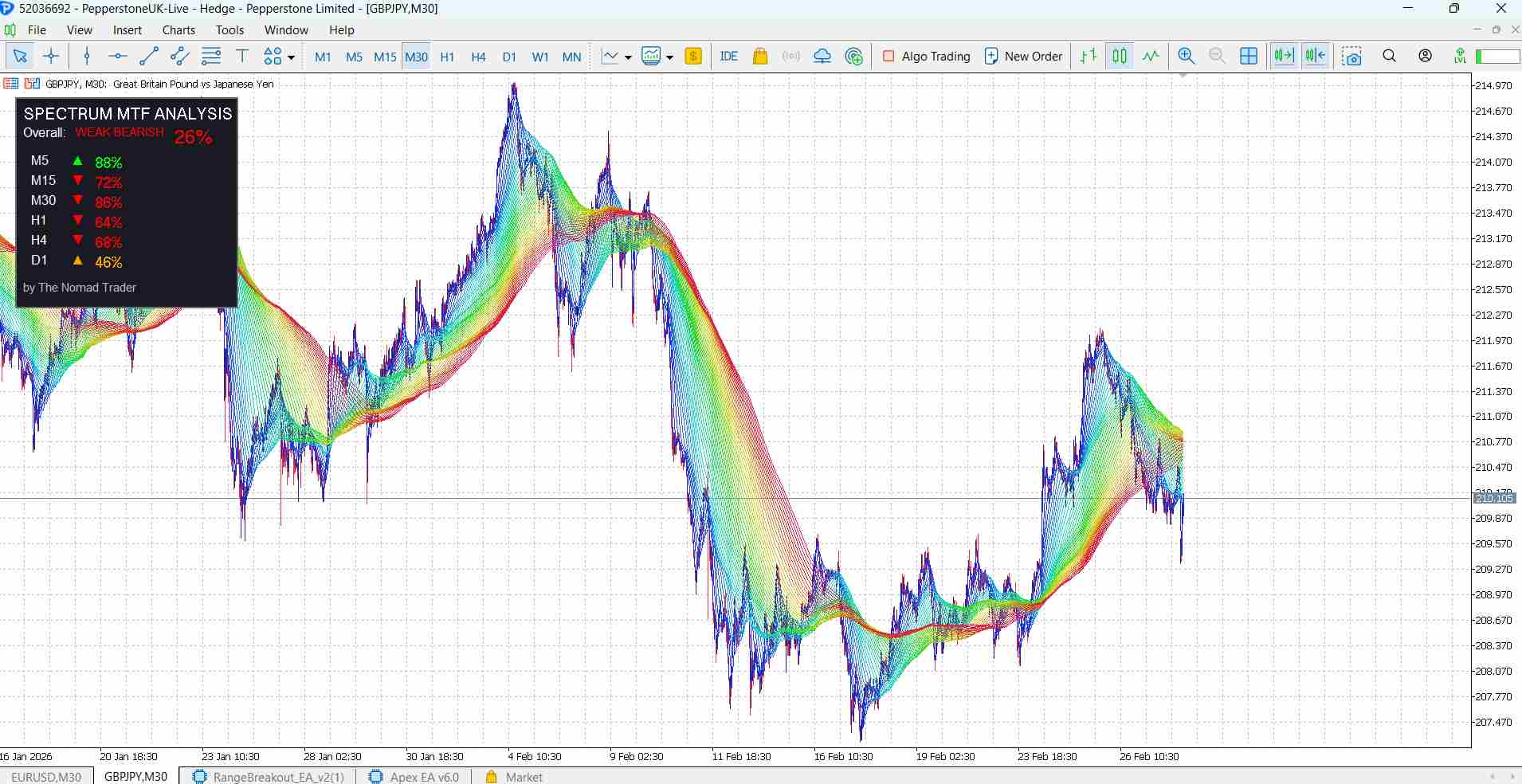
GBPJPY · M30 · Rainbow spectrum + MTF analysis panel · Pepperstone live account
SPECTRUM MTF ANALYSIS
Overall: WEAK BEARISH 26%
M5
↑
88%
M15
↓
72%
M30
↓
86%
H1
↓
64%
H4
↓
68%
D1
△
46%
by The Nomad Trader
What's inside
5 systems. One indicator.
Everything is calculated automatically, displayed cleanly, and designed to give you a decision — not more noise.
50-MA Rainbow Spectrum
Configure 2–50 moving averages with periods from 2 to 200. Colors transition smoothly from red (fast MAs) to blue (slow MAs) using HSL color space. When MAs align in rainbow order — trend is strong. When they tangle — caution.
Real-Time Sentiment Panel
A single percentage shows which side is winning. 85% green = price above 85% of all MAs. Instant clarity on trend strength without reading every individual line. Fully customizable position, size, and colors.
Multi-Timeframe Analysis
Simultaneous trend reading across 6 timeframes — M15, M30, H1, H4, D1, W1. Each shows a direction arrow. When all align, you have high-probability confluence. Conflicting arrows = stay out.
Trend Phase Detection
Automatically identifies 4 market phases: Compression (tight MAs, breakout incoming), Expansion (MAs spreading, ride the trend), Bullish Phase (65%+ sentiment, aligned MAs), Bearish Phase (65%+ bearish).
Smart Alert System
Configurable alerts fire when bullish or bearish sentiment crosses your threshold (default 70%). Intelligent reset logic prevents spam — alerts don't re-fire until sentiment drops 10% below the level.
Full Customization
4 MA types (SMA, EMA, SMMA, LWMA), any price type, adjustable line width, toggle fast/slow MAs independently, custom panel colors and position. Works identically on all symbols and timeframes.
Sentiment reading
What the % actually means
The percentage tells you exactly how many of the 50 MAs agree with the current price direction. One number. Zero ambiguity.
Trading strategies
3 proven approaches
Strategy 01
Trend Following
70%+ sentiment in direction
Price staying above/below spectrum
MAs aligned in rainbow order
MTF arrows confirming
Strategy 02
MTF Confluence
Check H4/D1/W1 for overall direction
2 of 3 higher TFs agree
Enter when current TF aligns
Use 70%+ sentiment as trigger
Strategy 03
Compression Breakout
Wait for MAs to compress tight (< 15 pips spread)
Watch sentiment rapidly move toward one side
Enter when 70%+ confirms
Ride expansion phase
Setup
Running in 2 minutes
01
Download the file
After purchase via Gumroad you receive the
Spectrum Trend Pro.ex5 file immediately. No wait, no manual approval.02
Copy to MT5 indicators folder
In MetaTrader 5: File → Open Data Folder → MQL5 → Indicators. Paste the .ex5 file here.
03
Refresh the Navigator
In MT5 open the Navigator (Ctrl+N), right-click Indicators → Refresh. Spectrum Trend Pro appears in the list.
04
Drag onto any chart
Drop the indicator onto any chart. Configure MA count, periods, and MTF settings in the dialog, then click OK.
05
Configure alerts (optional)
Enable alerts and set your sentiment threshold (default 70%). The indicator handles the rest automatically.
Full specifications
Everything under the hood
Platform & Compatibility
PlatformMetaTrader 5
Min MT5 Build2650 or later
SymbolsAll — Forex, Gold, Indices, Crypto
TimeframesAll — M1 to MN
DLL requiredNo
External connectionNo
ExpiryNone
RepaintsNo
MA Configuration
Starting MA Period2 (configurable)
Ending MA Period200 (configurable)
Number of MAs2–50
MA MethodSMA / EMA / SMMA / LWMA
Price TypeClose / Open / High / Low / Median
Line Width1–5 (adjustable)
Show Fast MAsToggle on/off
Show Slow MAsToggle on/off
MTF & Phase Detection
MTF TimeframesM15 · M30 · H1 · H4 · D1 · W1
MTF MA Period50 (configurable)
Compression threshold15 pips (default)
Expansion threshold40 pips (default)
Bullish phase65%+ sentiment
Bearish phase65%+ sentiment
Phase displayAuto-detected
Alert cooldownReset at -10% threshold
What's included
Indicator file (.ex5)✓
User manual (PDF)✓
Installation guide✓
Lifetime updates✓
Email support✓
Source code (.mq5)Not included
Auto-tradingNot included — analysis only
Get Spectrum Trend Pro
50 moving averages. Instant trend clarity. One-time purchase.
Get it now — $220 →Delivered via Gumroad · .ex5 + manual · No subscription · Lifetime license